
Quartz Studio Create step-by-step guides and support reports from real Windows actions
Capture real desktop actions, protect sensitive information, and export clean guides, QA reports, runbooks and procedures — locally, with no Quartz Studio cloud upload. One-time purchase. Lifetime license. No subscription.
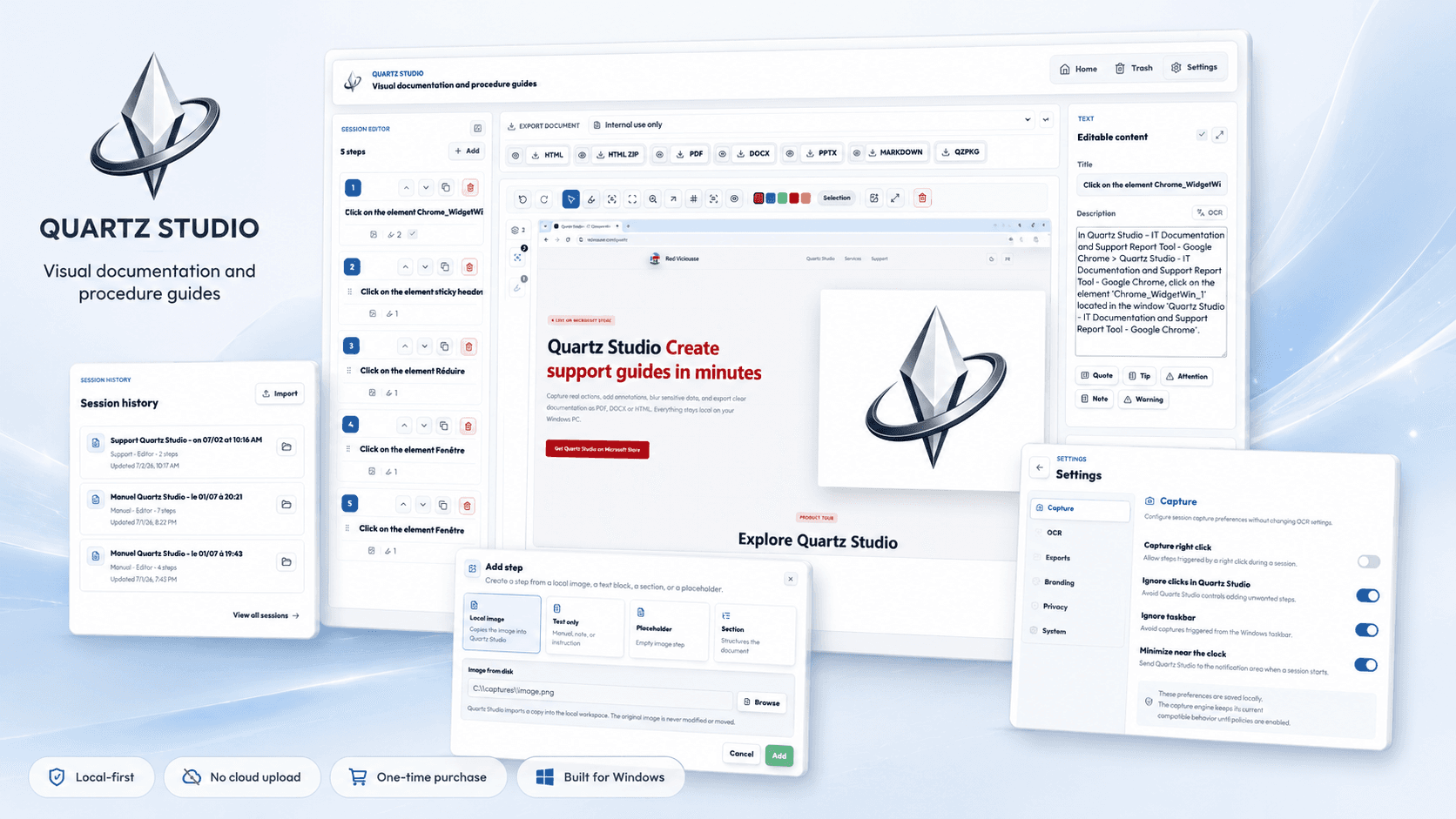
Document a real workflow without screenshot copy-paste
Start a session, perform your Windows workflow, then turn captured steps into a clear guide, support report, QA procedure or runbook ready to share.
1 / 3
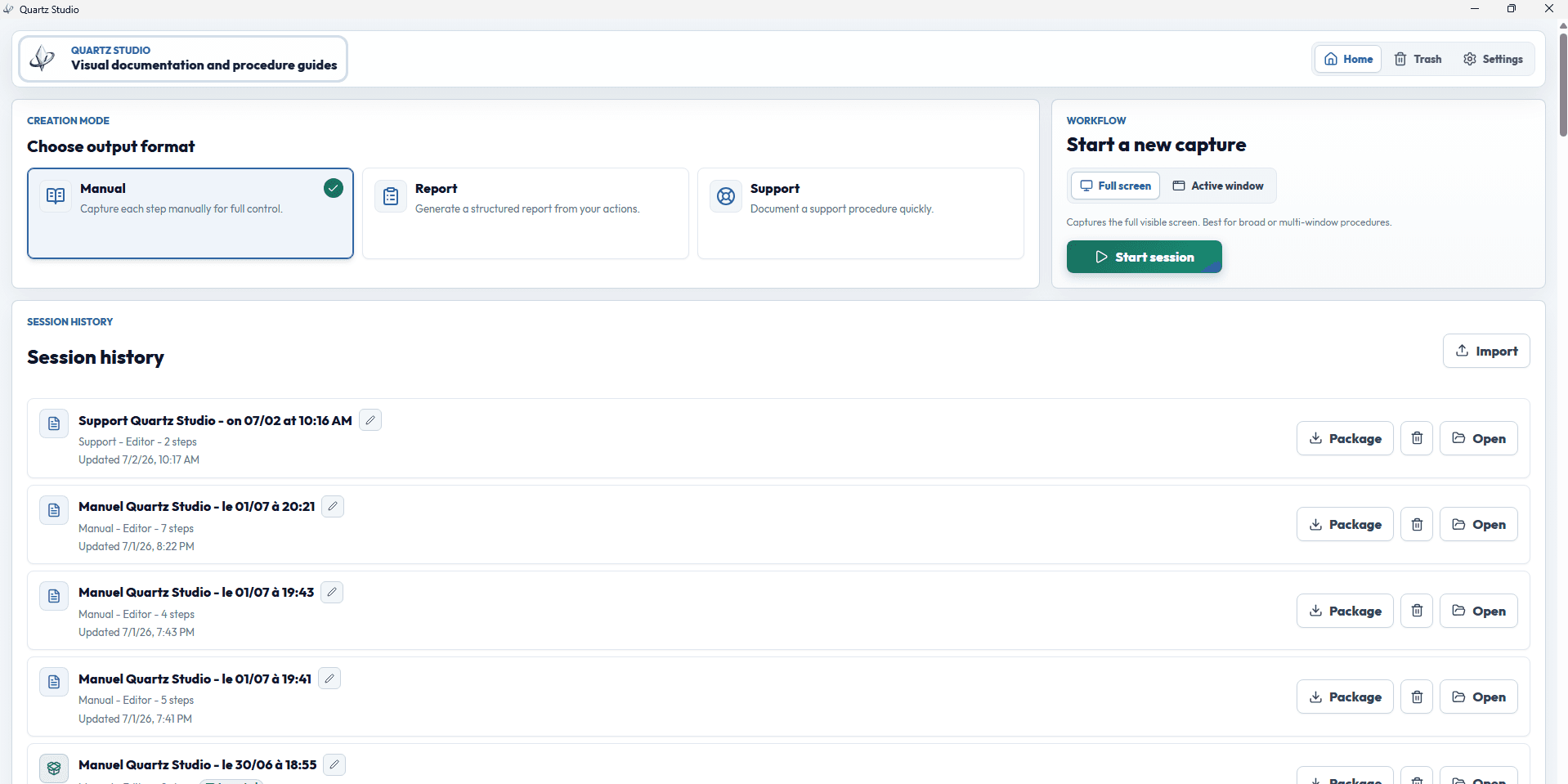
Start documenting in seconds
Choose a capture mode, document the real workflow, and keep every session organized so you can review, edit or export later.
Feature Highlights
Manual & assisted capture
Capture key steps manually or let Quartz Studio capture actions as you click, inside a session you start yourself.
Full-screen or active-window capture
Capture the full screen for context or only the active window for cleaner, more focused documentation.
Structured document editor
Turn captures into a readable document with sections, text-only steps, local images, placeholders, editable descriptions and simple reordering.
Annotations, blur & magnifier
Add arrows, numbers, notes, highlights, blur zones and magnifier areas to guide the reader without confusion.
Local OCR & privacy review
Extract text with local Windows OCR, review screenshots before export, and reduce the risk of sharing sensitive information.
Professional exports
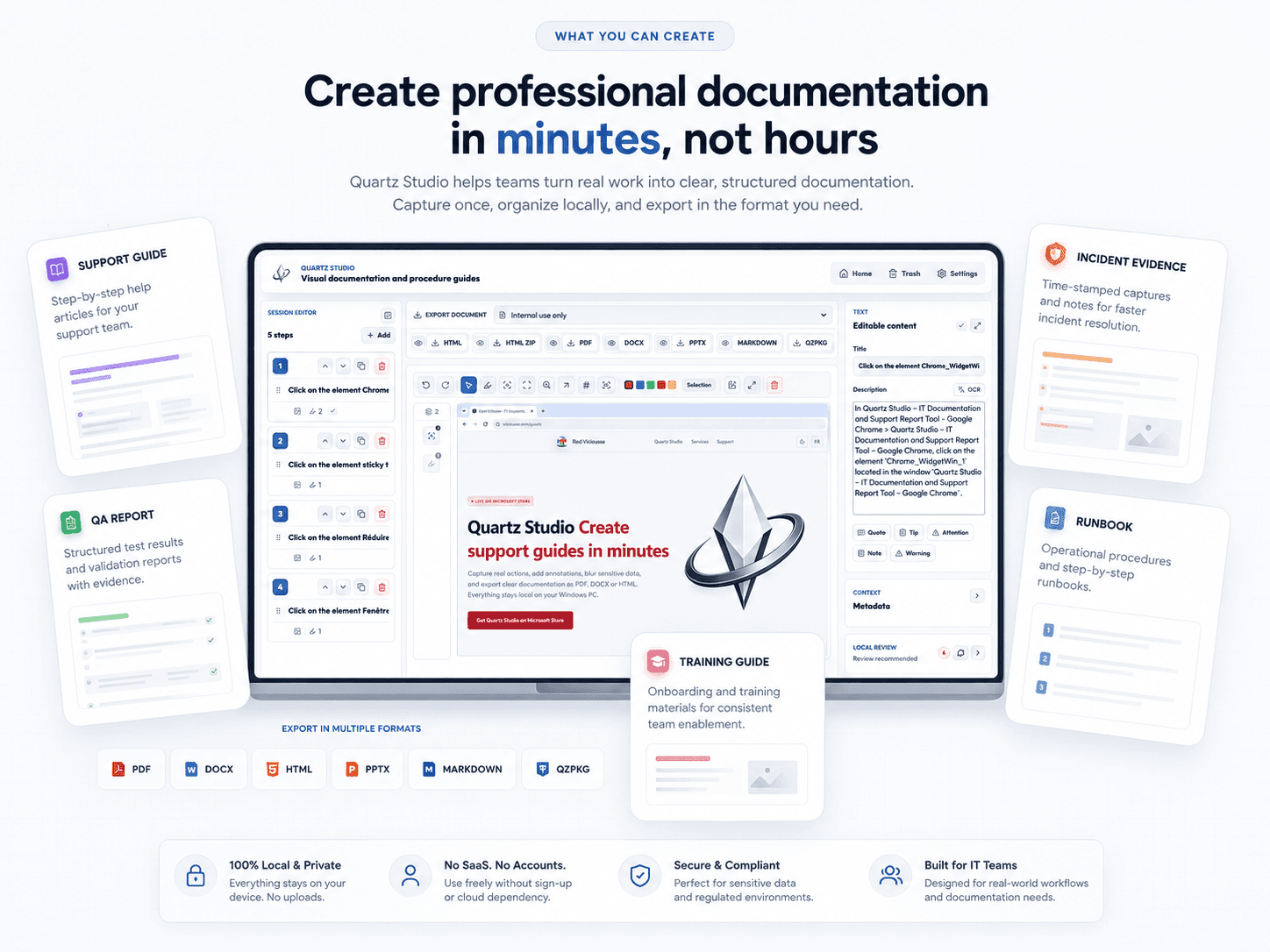
Export polished documents as PDF, DOCX, HTML, HTML ZIP, PowerPoint, Markdown or editable Quartz packages.
Built for teams documenting sensitive workflows
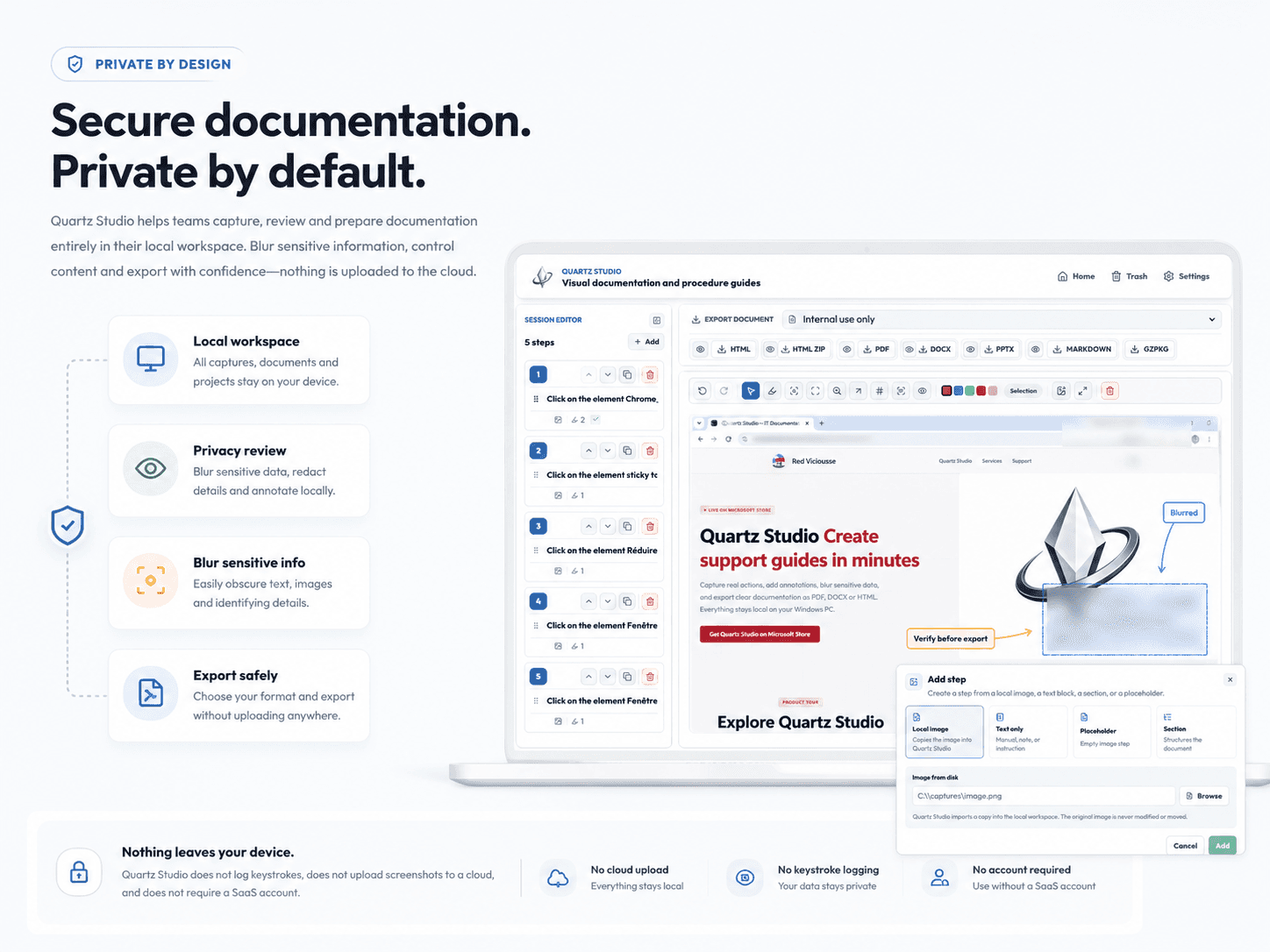
Customer tickets, incidents, internal tools, business procedures and QA tests often contain sensitive screenshots. Quartz Studio helps you create clear documentation without uploading screenshots, OCR text or project files to a Quartz Studio cloud. Your data stays in your local workspace, you stay in control before export, and you can blur information that should not be shared.
Create the documents your teams actually use
Quartz Studio helps you produce IT support guides, helpdesk reports, incident evidence, QA procedures, bug reproduction steps, runbooks, SOPs, user manuals, onboarding material and training documents. One workflow to capture, explain, protect and export.
Frequently Asked Questions
Everything you need to know before using Quartz Studio.
Who is Quartz Studio for?
Quartz Studio is built for IT teams, helpdesk professionals, customer support, QA, operations, training and technical documentation teams. It is especially useful when you need to turn real Windows actions into step-by-step guides, support reports, internal procedures or clear visual evidence.
Does Quartz Studio work locally?
Yes. Quartz Studio is a local-first Windows app. Screenshots, OCR text, annotations, exported documents and project files stay in your local workspace. You can create documentation without a Quartz Studio SaaS account.
Are my screenshots uploaded to the cloud?
No. Quartz Studio does not upload your screenshots to a Quartz Studio cloud. The core workflow runs locally on your Windows PC, which matters for customer tickets, internal screenshots, incident evidence and sensitive procedures.
Does Quartz Studio log keystrokes?
No. Quartz Studio does not log keystrokes. It is designed to visually document a workflow using screenshots, annotations, descriptions and structured exports.
What export formats are supported?
Quartz Studio can export documentation as PDF, DOCX, HTML, HTML ZIP, PowerPoint, Markdown and editable Quartz .qzpkg packages.
What is a Quartz package?
A Quartz .qzpkg package is an editable archive that preserves a documentation session with its steps, annotations and assets, so it can be reopened or transferred later.
How is Quartz Studio different from taking screenshots manually?
With Word, you have to capture, paste, resize, annotate, reorganize and export manually. Quartz Studio brings those steps into one workflow: capture, editing, blur, privacy review and professional export.
Can I hide sensitive information?
Yes. Quartz Studio lets you blur sensitive areas and review captures before exporting your documentation.
Do I need a subscription?
No. Quartz Studio is available on the Microsoft Store as a one-time purchase. You pay once, keep your lifetime license and use the app without monthly subscription fees or recurring costs.
Social proof
Built locally. Noticed publicly.
Quartz Studio is a focused Windows app for teams who need clean documentation, private screenshots and professional exports — without a SaaS account or monthly subscription. These badges highlight early public recognition around that simple promise.







US$14.99 · One-time purchase · Lifetime license · No subscription
Install Quartz Studio from the official Microsoft Store listing and get a lifetime license with a single US$14.99 purchase. No monthly subscription, no recurring fees and no SaaS account required. Final pricing may vary slightly by country, currency and Microsoft Store taxes.
Quartz Studio
Official Microsoft Store download


Product changelog
Quartz Studio is evolving fast
Updated 2026-07-11
Version 0.4.5 — A clearer, more consistent, and more professional experience.
- Improved wording and labels throughout the application for easier understanding.
- Improved readability and visual hierarchy across the main screens.
- Refined the editor for a smoother creation and review experience.
- Various stability, performance, and user experience improvements.
Version 0.4.4 — More export formats, better structure and more control before sharing.
- Added active-window capture for cleaner documentation.
- Added PowerPoint, Markdown, HTML ZIP and editable .qzpkg exports.
- Added Quartz package import/export to preserve editable sessions.
- Improved the structured editor with sections, text-only steps, local images and placeholders.
- Added local privacy review improvements before export.
- Added document presets for support, QA, incidents, runbooks and technical procedures.
- Improved branding options for professional document output.
Version 0.2.4
- Improved screen capture reliability with multiple monitors.
Capture now: now captures the display under the cursor.- Automatic captures after clicks now use the monitor that was clicked.
- Fixed an issue where captures could fall back to the primary display.
Version 0.2.3
- New dedicated preview workspace for easier document review.
- Editing panels are hidden during preview for a cleaner reading experience.
- Closing the preview returns directly to the full editor.
Version 0.2.2
- Prepared the first Microsoft Store release.
- Improved HTML, PDF, and DOCX exports.
- Confirmed the local-first workflow.
- Added support, privacy, and license pages.
Product updates
Follow Quartz Studio improvements
Get useful updates only: new features, export formats, templates, privacy improvements and important announcements. No spam.